


Dwellin: easy home maintenance
3.741.00 Reviews
App Specs
- Version
- 1.0.913
- Updated On
- License
- Free
- Downloads
- 10,000+
- Developer
- Dwellin.com
- Categories
- House & Home
- Platform
- Android
Screenshots
 Analysis by AppCompare
I tend to trust a home-management app when it helps me stay organized without asking me to hand over more information than I’m comfortable sharing. That matters here because a useful household inventory or maintenance plan can involve details about rooms, appliances, and routines. Dwellin is a free home and household app from Dwellin.com, and its focus is practical: keeping upkeep, supplies, and related decisions in one place. I’d approach it as an organizer, not as a substitute for a qualified professional or a guarantee that every repair will be simple.
What I would check before adding household details
Home information can be personal even when it seems ordinary. Before entering room or appliance details, I’d take a moment to decide what I actually need the app to help me manage. A basic list of maintenance tasks may be enough; there is no need to turn setup into a complete record of everything in the house if that would make me uneasy.
I also wouldn’t assume that account sign-in choices, device permissions, or data-handling practices work a particular way without checking the app’s current prompts and settings. Those are the places where a user can judge what is being requested and make an informed choice. If a prompt appears while I’m setting up, I’d read it rather than tapping through automatically, especially when the information seems unrelated to the task I’m trying to complete.
Keep the record useful, not overly detailed
There’s a practical balance between a helpful household record and one that takes too much effort to maintain. I’d begin with the items that are easiest to forget or most costly to neglect, such as recurring upkeep and supplies I want to check before shopping. For anything more sensitive, I’d ask myself whether recording it genuinely improves my routine. Good home organization should give you more control, not make you feel obliged to document every corner of your home.
This selective approach also makes it easier to see whether the app suits me before I commit to a larger inventory. If I stop using a feature because it demands more upkeep than it saves, that is useful feedback, not a reason to keep adding information in the hope that the system will eventually feel effortless.
Ever wished home maintenance could be as easy as ordering a pizza? Well, let me introduce you to Dwellin, an app that promises to simplify your life by managing all those pesky home chores. Whether you're a seasoned homeowner or a newbie, this app could be a game-changer for keeping your place in tip-top shape.
Getting Started with Dwellin
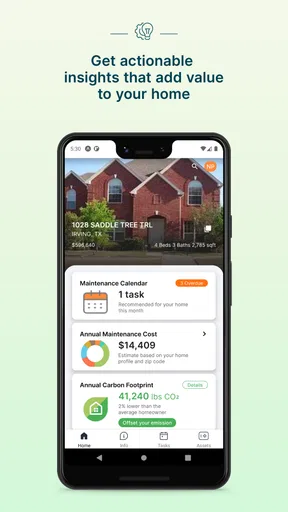
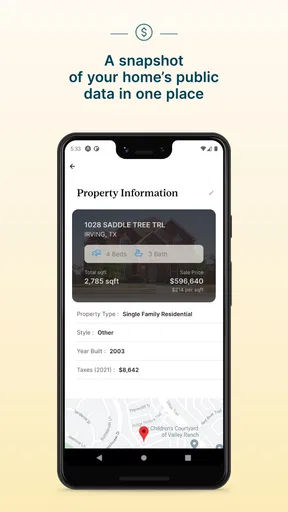
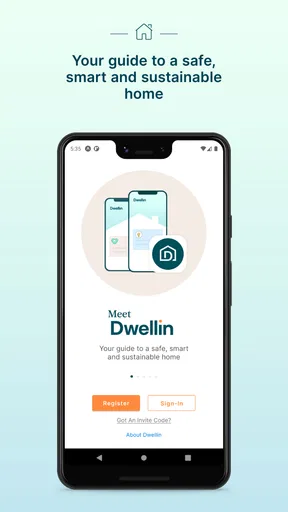
The first thing you'll notice about Dwellin is its clean and user-friendly interface. Setting up the app is a breeze. After downloading it from your preferred app store, you'll need to create an account or simply log in using your Google or Apple ID. The app then guides you through a quick setup process. You input details about your home, like the number of rooms and appliances, and voilà, you're ready to go!
Worth Reading Before You Choose

Flipboard Shows What News Apps Must Do Beyond the Feed

Switching to Android Auto Means Rethinking Your Driving Routine

Google Calendar Makes a Crowded Week Easier to Manage

Ludo King Makes the Most of the Minutes Between Plans

Baby Panda World Brings Quick Play to Modern Phones, but Its Game Library Feels Busy

ESPN’s Live Game View Makes Following Close Games Easier
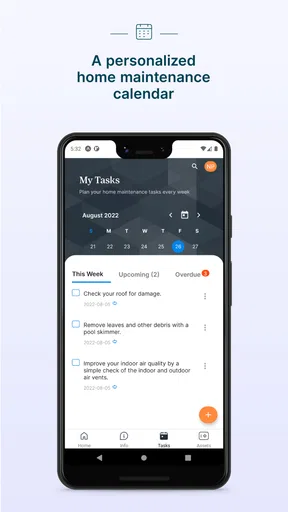
One feature that immediately caught my eye was the app’s ability to customize reminders. You can set alerts for everything from changing air filters to watering your plants. It’s like having a personal assistant who never forgets. Trust me, this is a lifesaver, especially if you tend to procrastinate on home tasks as I do.
Features That Stand Out
Dwellin isn't just about reminders; it offers a whole suite of tools to make home maintenance painless. Here's a quick rundown:
- Maintenance Tips: Each task comes with handy tips and tricks. If you're clueless about how to unclog a drain or fix a leaky faucet, the app has got you covered.
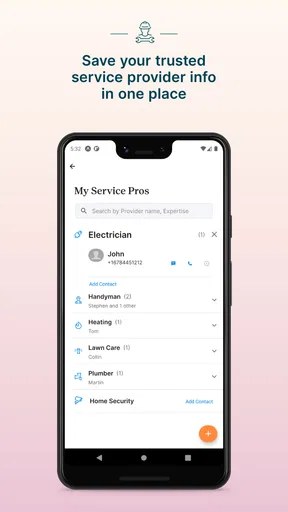
- Service Provider Directory: Need a professional? Dwellin connects you with trusted local service providers. You can book appointments directly through the app.
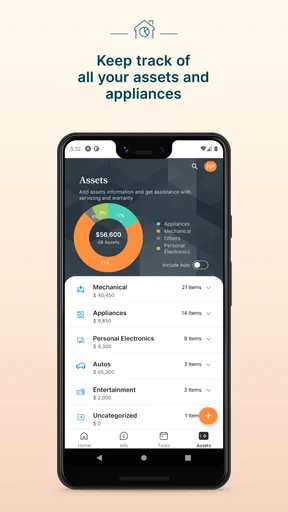
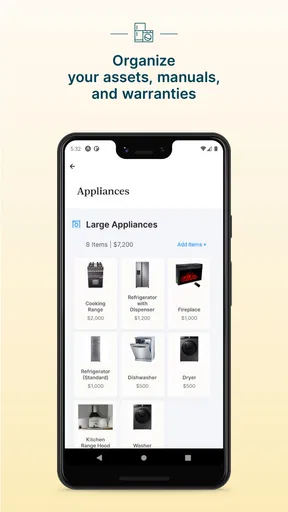
- Inventory Management: Keep track of household supplies. No more last-minute runs to the store because you forgot you were out of light bulbs.
- Customizable Calendar: The calendar feature lets you see all your scheduled tasks at a glance, making it easy to plan your week.
Real-Life Applications
Now, let's talk about how Dwellin performs in the real world. I put the app to the test over a month, and here’s what happened. First off, the reminder system is spot on. It pinged me to clean out my fridge, something I’d been putting off for weeks. And the satisfaction of checking off that task? Priceless!
The service provider directory was another highlight. I had a minor plumbing issue, and finding a reputable plumber was as simple as a few taps on my phone. The app includes reviews and ratings, which helped me feel confident in my choice.
One area where the app could improve is in the integration of smart home devices. While it covers the basics, I found myself wishing for a seamless link with my smart thermostat and security system.
Making it work in a real household
The best way I’ve found to make a maintenance organizer stick is to start with a short, dependable routine rather than loading it with every task I can think of. For example, I’d add the recurring jobs I tend to postpone, then check the calendar once a week while planning errands. That small habit turns a reminder into a decision: do it now, buy what’s needed, or set aside time for a professional.
A realistic use case is getting ready for a busy weekend. Suppose I notice a household supply is running low while checking the inventory, and I also have a maintenance task coming up. I can use the list to avoid buying duplicates, then use the schedule to decide whether the task fits before guests arrive. The useful insight is that maintenance and inventory work best together when they inform a single plan; a supply list on its own can become another list to ignore.
For a shared home, I’d be deliberate about who is responsible for acting on reminders. An alert is only useful if somebody knows whether it means “do this today,” “add this to the shopping trip,” or “ask a specialist.” Even without treating an app calendar as a household agreement, using a consistent naming style for tasks can reduce confusion—for instance, noting the room or appliance in the task label. That is a simple way to make a busy schedule easier to scan.
Where it fits among the usual alternatives
Compared with a paper checklist or a note-taking app, Dwellin is more purpose-built for home upkeep: maintenance reminders, an inventory, tips, a calendar, and a service-provider directory sit within the same home-focused experience. That can save me from scattering chores across a notes app, a calendar, and a shopping list. The trade-off is that a general calendar or notes tool may be more flexible if I only need to remember a handful of jobs and already have a system I trust.
It also occupies a different role from a smart-home control app. I would use a thermostat or security app to operate connected devices, while Dwellin is aimed at organizing the human work around a home. Its lack of the smart-device integration I wanted makes that distinction important: if my main goal is automation or controlling equipment from one screen, I’d choose a dedicated smart-home platform instead. If my problem is forgetting upkeep and household supplies, Dwellin is the more relevant kind of tool.
The directory may be convenient when I need help finding a service provider, but I’d still treat choosing a professional as my decision. I would compare the available information, confirm the scope and cost directly, and make sure the provider is right for the job before booking. An in-app directory can shorten the search; it doesn’t remove the need to judge a repair or ask practical questions.
Who is likely to benefit—and who may not
I can see this being most useful for a first-time homeowner who is building maintenance habits, someone managing a busy household, or anyone who keeps rediscovering that a supply has run out. The reminders and calendar can make recurring tasks visible, while the inventory can help connect a chore to what needs to be bought. It may also suit a person who wants simple guidance before deciding whether a task is within their ability.
I would skip it if I strongly prefer not to create an account or enter any household details, or if I already have a low-friction routine that works. It is also not the right tool for someone looking for a complete smart-home dashboard, detailed project management, or professional diagnosis. The app can help organize decisions, but a serious leak, electrical concern, or other risky repair still calls for appropriate expertise rather than confidence gained from a tip.
Cost is another sensible part of deciding. The app is free to install, with in-app purchases ranging from $2.99 to $24.99 per item. I’d try the basic experience first and only consider a paid item if I understood exactly what it adds and expected to use it. That avoids paying for a feature simply because it appears during setup or seems potentially useful someday.
Version, audience, and everyday expectations
The app is rated for Everyone, has an average rating of 3.7 from around 145 ratings, and has passed 10,000 installs. Those figures suggest that people are using it, but they don’t tell me whether its workflow will suit my particular home. I’d treat the rating as a prompt to test the basics myself: can I find the calendar quickly, are reminders easy to manage, and does keeping inventory feel worth the effort?
Dwellin was released on March 23, 2022, and its current version is 1.0.913. It supports devices running Android 7.1 or later. Before installing, I’d check that my device meets that requirement, then give myself a few days to see whether the app fits my routine instead of trying to populate every feature on the first evening.
One useful test is to choose a task with a clear next action, such as checking a supply before the next shopping trip. If the reminder helps me act without creating extra sorting or duplicate entries, that is a better sign than a long list of chores entered all at once. For maintenance that depends on a manufacturer’s instructions or a professional schedule, I’d use those sources as the authority and treat the app as a way to remember the next step.
Features That Stand Out
Dwellin isn't just about reminders; it offers a whole suite of tools to make home maintenance painless. Here's a quick rundown:
- Maintenance Tips: Each task comes with handy tips and tricks. If you're clueless about how to unclog a drain or fix a leaky faucet, the app has got you covered.
- Service Provider Directory: Need a professional? Dwellin connects you with trusted local service providers. You can book appointments directly through the app.
- Inventory Management: Keep track of household supplies. No more last-minute runs to the store because you forgot you were out of light bulbs.
- Customizable Calendar: The calendar feature lets you see all your scheduled tasks at a glance, making it easy to plan your week.
Real-Life Applications
Now, let's talk about how Dwellin performs in the real world. I put the app to the test over a month, and here’s what happened. First off, the reminder system is spot on. It pinged me to clean out my fridge, something I’d been putting off for weeks. And the satisfaction of checking off that task? Priceless!
The service provider directory was another highlight. I had a minor plumbing issue, and finding a reputable plumber was as simple as a few taps on my phone. The app includes reviews and ratings, which helped me feel confident in my choice.
One area where the app could improve is in the integration of smart home devices. While it covers the basics, I found myself wishing for a seamless link with my smart thermostat and security system.
Why You Should Try Dwellin
If you’re someone who struggles with keeping up on home maintenance, Dwellin could be your new best friend. The app’s intuitive interface and robust feature set make it a must-have for anyone looking to keep their home running smoothly. It takes the guesswork out of home care, saving you time and potentially costly repairs down the line.
And hey, even if you think you’ve got a handle on things, it never hurts to have a backup plan. Download it, give it a whirl, and see how much easier managing your home can be.
So, what are you waiting for? Check out Dwellin on your app store today and start transforming your home maintenance routine into a stress-free experience. You might just find it’s the app you never knew you needed.
A cautious verdict
My recommendation is measured: I’d try Dwellin if the problem I wanted to solve was remembering household upkeep, coordinating a few recurring jobs, or keeping a modest supply list. Its home-specific tools are more convenient than a loose collection of notes when I’m willing to maintain them. The strongest test is whether it reduces the mental load after the first setup, not whether it can hold an exhaustive record.
I would keep my expectations grounded. The app can support a routine, but it cannot make every repair safe to attempt, verify a service provider’s suitability on my behalf, or replace a smart-home controller. I’d also make choices about what household details to enter based on the visible prompts and controls I encounter, rather than assuming anything about permissions or data practices. For a person who values a practical reminder system and is comfortable assessing those choices, it is worth a cautious try; for someone seeking automation or a fully private paper-based setup, another approach will fit better.
Pros
- Intuitive interface for easy navigation.
- Customizable reminders for tasks.
- Supports multiple properties management.
- Offers expert tips and advice.
- Secure storage for maintenance records.
Cons
- Limited integration with other smart home apps.
- Subscription required for premium features.
- Occasional bugs in notification system.
- No offline mode available.
- Limited support for older devices.
FAQs for Dwellin: easy home maintenance
What features does Dwellin offer for home maintenance?
Dwellin provides a comprehensive suite of features designed to simplify home maintenance. Users can schedule reminders for routine tasks, access a library of maintenance tips, and track completed tasks. The app also offers a directory of local service providers, making it easy to find professionals for repairs or renovations.
Is Dwellin available on both Android and iOS platforms?
Yes, Dwellin is available for download on both Android and iOS platforms. Users can find the app on the Google Play Store for Android devices and the Apple App Store for iOS devices, ensuring broad accessibility across different smartphone users.
Does Dwellin require a subscription or is it free to use?
Dwellin offers both free and premium versions. The free version includes basic features like task scheduling and maintenance tips. For advanced features, such as access to exclusive content and additional customization options, users can opt for a subscription model with a monthly or annual fee.
Can Dwellin connect me with local service providers?
Yes, one of Dwellin's key features is its integrated directory of local service providers. Users can search for professionals in various fields such as plumbing, electrical, and carpentry, and view ratings and reviews to make informed decisions about who to hire for home maintenance tasks.
How user-friendly is the Dwellin app for beginners?
Dwellin is designed with user-friendliness in mind, featuring an intuitive interface that makes navigation easy for beginners. The app includes a step-by-step guide to help new users set up their home maintenance schedules, ensuring they can start managing tasks efficiently without any hassle.


